
How to record your acceptance videoHOW TO RECORD YOUR ACCEPTANCE VIDEO
45 seconds, filmed on a phone, due Friday 23 October.
Your video plays during the ceremony on 7 November, lives on the winners page, and goes to our media partners. Last year COOL HUNTING ran the winners video in full, so this travels further than the evening itself.
Here is last year's, so you can see what you're making:
https://www.youtube.com/watch?v=ZRfB3vc0bmw
WHAT TO SAY
Record it as if your category has just been read out, because that is the moment it plays. Four beats, and 45 seconds goes faster than you think:
1. Name yourself and the project. "I'm [name], and this is [project]." We need this so the clip works on its own, away from the ceremony.
2. One line on what it actually is. Not a full pitch.
3. Ten to fifteen seconds on what you were trying to do. This is the part that gets quoted.
4. Thank whoever built it with you, and say what's next if you like. No “follow me on or go to www….”. We add where people can find you.
HOW TO FILM IT
Landscape. Hold the phone sideways, or better, prop it against something at eye level. Don't film vertically — a vertical file can't go in the ceremony reel or on the website.
Rear camera, not the selfie camera. It's sharper on almost every phone.
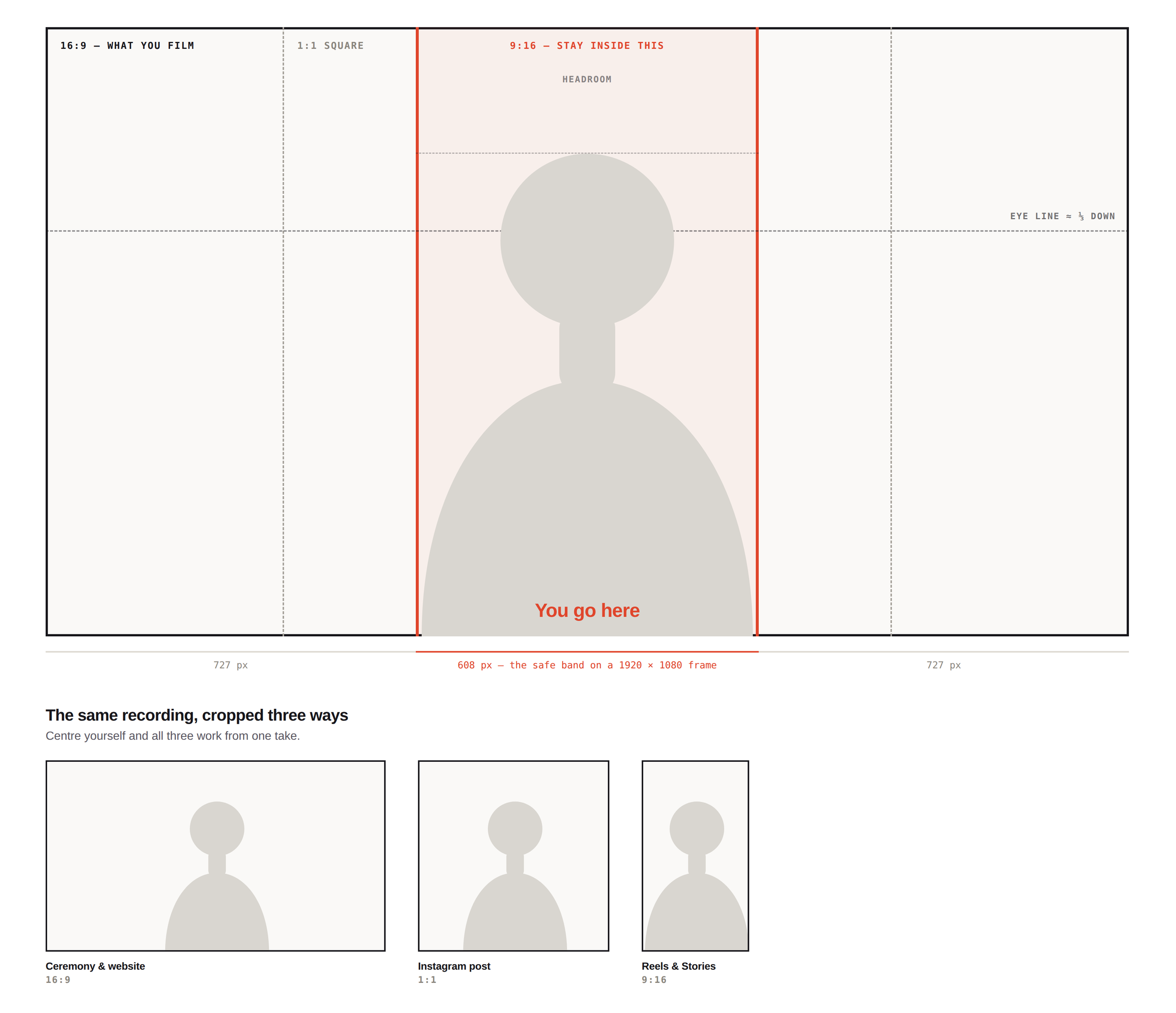
Sit in the middle of the frame. We crop these to square and vertical for Instagram, so anyone off to one side loses their head. Centre yourself, leave a little space above your head, and put your eyes about a third of the way down the frame.
Face the light. A window or a lamp in front of you, nothing bright behind you.
Find a quiet room. Soft furnishings help. Keep the phone within a metre, or use earbuds with a mic. No music playing.
Turn off Cinematic mode, portrait mode and any beauty filter. The artificial background blur falls apart around hair and shoulders once we crop.
Tap and hold on your face to lock focus and exposure before you start, wipe the lens, and put the phone in airplane mode so a call can't land mid-take.
Leave two seconds of silence at the start and the end before you stop recording. It lets us cut cleanly.
TECHNICAL
Format: MP4 (H.264). MOV from an iPhone is fine.
Resolution: 1920x1080 minimum. 4K welcome — it gives us more room to crop.
Orientation: 16:9 landscape
Frame rate: 25 or 30fps. Not 60, not slow motion.
Audio: recorded with the video, no separate track needed
File size: under 2GB
Highest quality setting your phone offers
PLEASE DON'T ADD
No titles, subtitles, captions, name cards, logos, music or transitions. We add all of that so the nine winner videos look like one set. Anything baked in has to be re-shot.
HOW TO SEND IT
Please send your acceptance video, headshot, and any additional images or footage you'd like us to use, through this link: https://forms.gle/GcZ3YtYS2b6UXAKfA
Everything by Friday 23 October.
If there are any issues with the upload on the form, please send files through swisstransfer.com or wetransfer.com to info@psychedelics.design — please set the expiry to 30 days.
Or send a link to your own Drive or Dropbox folder — just set it so anyone with the link can view, or we won't be able to open it and we can't chase permissions.
If the upload doesn't work, put the files on SwissTransfer or your own Drive and paste the link into the last question of the form instead. That way everything stays in one place.
Please name your files with your project name rather than IMG_4821, and don't email the files themselves — they're too large for most inboxes and they get lost.
ONE LAST THING
The video says you won. Please don't post it, or any part of it, before the ceremony on Saturday 7 November. After that, share it everywhere.
GOT A QUESTION?
Please do reach out to either zoe@zoewilder.com or info@psychedelics.design
2025 ExampleThe spec
LENGTH
45 seconds. Hard maximum 60. Nine categories at 60 seconds is fifteen minutes of ceremony once Dennis introduces each one.
ORIENTATION
Landscape, 16:9. Not vertical, not square — a vertical file looks odd in the reel or on the winners page.
WHERE TO POSITION YOURSELF IN THE FRAME
Dead centre, horizontally. We crop these to square and vertical for Instagram, and anything off to one side loses its head. On a 1920-wide frame, keep yourself inside the middle. (1080 pixels — roughly the central 55% — with about 420px clear on each side; if we wanna get all geeky about it).
FRAMING
Head and shoulders, a little space above the head, eyes about a third of the way down. Look at the lens, not at your own face on the screen.
RESOLUTION
1920×1080 minimum. 4K welcome and gives us more crop room. And then any landscape recording with your phone will do.
FILE
.mp4, H.264. .mov from an iPhone is fine too. Under 2GB.
CAMERA
Again, a phone is completely fine — use the rear camera, not the selfie camera, and prop it at eye level. Don't hold it.
PHONE SETTING
Turn off Cinematic mode and any beauty or portrait filter — the fake background blur breaks up around hair and shoulders when we crop. Tap and hold to lock focus and exposure. Wipe the lens. Put it in airplane mode so a call can't land mid-take.
LIGHT
Face a window or a lamp. Nothing bright behind you.
SOUND
Quiet room, phone within a metre. Earbuds with a mic beat a distant phone. No music underneath.
EXTRAS
Two seconds of silence at the start and end before you stop recording. It lets us cut cleanly.
DON’T ADD
No titles, subtitles, captions, logos, music or transitions. We add all of it so the nine videos look like one set — anything baked in has to be re-shot.
DUE
Friday 23 October, through the intake form. Files sent by email won't reach us.